Fuel Forward
Phillips 66 MobilityAuto & Vehicles
4.43.96K Reviews
- Version
- 7.11.0
- Installs
- 1.00M
- Age Rating
- Mature 17+
Screenshots
Our Review of Fuel Forward
 Analysis by Appyee
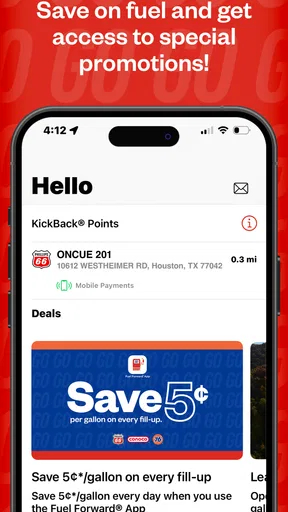
When I use a fuel app, I want it to remove one small annoyance from driving rather than create another account, another card to carry, or another screen to manage. Fuel Forward is built around that practical idea. Developed by Phillips 66 Mobility, it is a free Auto & Vehicles app for people who regularly stop at Phillips 66, Conoco, or 76 stations and want to handle mobile payments and fuel savings from one place.
My overall impression is that Fuel Forward is most useful when your normal routes already include its participating station brands. It is not a universal fuel-finding tool that makes every station equally convenient. Instead, it works best as a brand-focused companion for drivers who want a quicker checkout routine and a reason to keep their fuel activity inside one app.
The app has been available since October 1, 2014, and the current version is 7.11.0. It is rated for Mature 17+ and requires iOS 11 or later. With an average rating of 4.5 from around 9,200 ratings, it has also passed the trial stage for many drivers; more than a million people have installed it. Those figures do not replace personal testing, but they do suggest that Fuel Forward has become a familiar tool rather than a short-lived experiment.
What I would check before switching to Fuel Forward
My first decision criterion would be station coverage along the roads I actually drive. The app is connected to Phillips 66, Conoco, and 76 stations, so its value depends on whether those names appear near home, work, regular errands, or longer trips. If I usually choose whichever independent station is closest, a brand-specific app may add little. If one of these station groups is already part of my routine, the calculation changes immediately.
The second question is whether I prefer paying at the pump with a phone or continuing to use a physical card. Mobile payment can be convenient, but convenience is not automatic. I still need my phone available, the app ready, and a payment setup that works when I arrive. For someone who enjoys a simple tap with a wallet card and does not care about fuel savings tied to an app, the benefit may feel too small.
I would also consider how often I buy fuel. A daily commuter has more opportunities to benefit from a smoother routine than someone who fills the tank only occasionally. Frequent drivers can justify learning the app, checking its available savings, and making it part of the refueling habit. Occasional drivers may prefer a conventional payment method because there is less to remember.
One useful way to judge it is to separate three jobs that drivers often expect one application to perform: locating a suitable station, paying for fuel, and reducing the cost of the purchase. Fuel Forward is clearly aimed at the last two. If my main problem is finding the cheapest station across every brand, I would compare it with a broad navigation or fuel-price app instead of assuming this one will solve that problem.
I would also pay attention to phone readiness. Before relying on it for a busy commute, I would open the app at home, review the payment setup, and make sure I understand the pump workflow. That small rehearsal matters because the worst time to learn a payment process is while a line is waiting behind me. In my experience with any mobile payment tool, preparation is what turns a promising feature into a genuinely faster one.
The everyday situation where it makes the most sense
Imagine leaving work with a nearly empty tank and stopping at a Conoco station that is already on the route home. Instead of searching through a wallet for a card, I can use Fuel Forward as the payment step and keep the transaction connected to the app’s fuel-saving purpose. The advantage is not dramatic entertainment or a long list of extras; it is the reduction of small decisions during a routine stop.
That workflow becomes more valuable when repeated. A driver who stops at the same Phillips 66 station every few days can develop a predictable pattern: open the app before reaching the pump, confirm the intended station, complete the payment process, and check that the savings have been applied as expected. The practical insight is to make the app part of the route, not something I install only when the tank is already empty.
For a road trip, I would use it selectively rather than depend on it for every stop. If a Phillips 66, Conoco, or 76 station is convenient, Fuel Forward can handle that visit. If the route leads to other brands, I would keep a regular payment method ready. That mixed strategy avoids turning a useful brand app into a source of stress when the next suitable station is outside its network.
Where Fuel Forward wins over ordinary payment habits
The strongest part of the experience is the combination of secure mobile payments and fuel savings in a single brand-focused tool. A normal bank card can pay for fuel, but it does not necessarily give me a dedicated place to manage a station-brand saving opportunity. Fuel Forward makes the fuel purchase itself the center of the experience, which is more focused than using a general wallet for everything.
I also like the possibility of leaving a physical card in my wallet while still having a payment route at the pump. That is especially handy when I am carrying groceries, traveling light, or trying to avoid handling several items in bad weather. The benefit is modest at one stop, but repeated convenience is exactly where this kind of app earns its place.
Another advantage is mental organization. Rather than treating every fuel purchase as an isolated bank transaction, I can use one dedicated app for the stations it supports. That makes it easier to remember where the fuel-saving value is supposed to appear and whether the app is worth keeping. The trade-off is that this organization only helps when I actually buy from the participating brands.
Fuel Forward also has a clearer purpose than many general loyalty applications. Its identity is not built around unrelated shopping categories or a broad collection of services. For me, that focus makes the app easier to evaluate: I install it for mobile fuel payment and savings, then decide whether those two functions improve my normal stops.
There is a practical privacy and security habit I would recommend here: treat the phone as part of the payment process, not merely as a coupon screen. I would lock the device, avoid handing it to anyone at the pump, and check the transaction before driving away. Those steps are not special Fuel Forward features; they are sensible behavior whenever a phone replaces a card.
Small workflow choices that improve the experience
My first tip is to test the process during a quiet refueling stop rather than during a rush-hour visit. I would keep my physical payment method available for that first attempt, confirm the station brand, and make sure the app behaves as expected before making it my only option. This turns the initial setup into a controlled test instead of a gamble.
My second tip is to decide in advance whether I am choosing a station for convenience or for savings. Fuel Forward may make a participating station more attractive, but a longer detour can erase the value of a saving. I would compare the extra driving with the expected benefit and choose the app-supported stop only when it fits the route naturally.
My third tip is to review the final purchase after refueling, not just the pump display. A quick check helps me notice whether I used the intended payment route and whether the saving appeared in the way I expected. It also prevents a common mistake with loyalty-style tools: assuming that opening an app automatically means the transaction was completed through it.
A fourth useful habit is to keep the app’s role narrow. I would not use it as my only travel-planning tool. For route planning, traffic, unfamiliar areas, and comparing unrelated stations, a general navigation app or a broad fuel-search service may be better. Fuel Forward can then handle the brand-specific payment and saving task without being forced to do a job it was not designed to replace.
Where a different type of app may fit better
The usual alternative is simply paying with a bank card or mobile wallet. That option wins on universality: I can use it at almost any station, without thinking about brand coverage. It is the better choice for drivers who value maximum flexibility, stop at many different fuel companies, or dislike maintaining separate retailer apps.
A general navigation app may be better for someone whose priority is finding a station along an unfamiliar route. It can support the broader driving decision, while Fuel Forward is more focused on the transaction at Phillips 66, Conoco, or 76. I would use the navigation tool to decide where to stop and Fuel Forward only when the selected station makes its features worthwhile.
A broad fuel-price comparison service can also be a stronger fit for a price-first driver. That kind of alternative encourages comparison across brands, whereas Fuel Forward is naturally tied to its supported station network. If the cheapest available fuel is always the goal, regardless of brand, I would not let the presence of mobile payment alone determine my choice.
There is also a behavioral alternative: use a physical loyalty card or remember a station account without installing another app. That approach may be slower or less integrated, but it has one major advantage—less dependence on battery life, connectivity, and a phone screen. Drivers who frequently travel through weak-signal areas or keep their phones reserved for navigation may reasonably prefer it.
For families or shared vehicles, the decision becomes more personal. If several people drive the same car, Fuel Forward is most convenient when the person refueling can reliably access the configured payment method. A shared physical card may be simpler for a household that does not want to coordinate app access. On the other hand, a primary driver who handles most fuel purchases may appreciate having everything in one place.
The real cost of changing your routine
Because Fuel Forward is free, the main cost of switching is not the download price. It is the time spent setting up a new payment habit and remembering to use the app at the right station. I would also count the attention required to check savings, confirm the station, and keep a backup payment option available while learning the process.
That learning cost is reasonable for a regular customer of Phillips 66, Conoco, or 76. Each successful stop reinforces the routine, and the app can gradually replace the need to reach for a card. For someone who visits these stations only once in a while, the setup may never pay back in convenience. In that case, a normal card or wallet app is probably the cleaner choice.
There is an opportunity cost as well. Choosing an app-supported station may mean passing a closer station from another brand. I would not make that detour automatically. The right comparison includes distance, traffic, the size of the expected saving, and whether I was already planning to stop there. Fuel Forward is strongest when it improves a decision I was already going to make, not when it persuades me to make an inconvenient trip.
Phone dependence is another trade-off. A dead battery, a locked account, or a last-minute change in plans can make a physical card feel much more dependable. My solution would be simple: carry a backup payment method and avoid testing the app for the first time when the fuel warning is urgent. That does not undermine mobile payment; it acknowledges how real driving conditions can differ from an ideal checkout.
I would also give myself a short evaluation period. After several normal fuel stops, I would ask whether the app has actually saved time or money, whether the supported stations fit my routes, and whether I remember to use it without effort. If the answer is no, uninstalling it is sensible. A free app still occupies attention, and not every useful tool deserves a permanent place on every phone.
Who should use it, and who should skip it
I would recommend Fuel Forward to a driver who regularly visits Phillips 66, Conoco, or 76 stations, wants mobile payment at the pump, and is willing to build a repeatable routine. It is particularly appealing for commuters, households with a primary fuel buyer, and drivers who value having fuel savings attached directly to the station experience.
I would be more cautious for someone who travels widely and chooses stations based only on location or price. That driver may get more from a general navigation or fuel-comparison option, with a regular card or mobile wallet handling payment. Fuel Forward can still be installed as a secondary tool, but it should not be treated as the central solution for every refueling situation.
The Mature 17+ rating is worth noticing for households deciding what to place on a younger driver’s phone. This is a payment-oriented vehicle app, not something I would hand over without discussing responsible purchasing and account use. The age label does not change the app’s usefulness for adults, but it is part of making a sensible installation decision.
My recommendation after weighing the trade-offs
Fuel Forward earns a recommendation when its station network matches your life. I would install it, configure it carefully, try it first with a backup card available, and use it on routes where a Phillips 66, Conoco, or 76 stop is already convenient. In that situation, the combination of mobile payment and fuel savings can make an ordinary chore feel more organized.
I would not recommend switching simply because every driver needs a fuel app. They do not. If you rarely visit the supported brands, want to compare every station in an area, or prefer the reliability of a physical card, the usual alternatives may serve you better. The app’s focused design is its strength, but that same focus limits its usefulness outside the stations it targets.
My final view is positive but specific: Fuel Forward is a practical companion for brand-loyal drivers, not a universal replacement for every refueling tool. Its free price lowers the risk of trying it, while its established presence and strong average rating make it worth a fair test. I would keep it when it saves me repeated effort on familiar routes; I would skip it when my driving habits demand maximum station choice.
In short, I see it as a decision-support app for a particular kind of driver. It helps most when the station is already on the way, the phone is ready, and the savings are part of a consistent routine. Used that way, it stays simple and useful. Expected to cover every brand, every route, and every payment preference, it becomes the wrong tool for the job.
Privacy and Permissions
See what permissions an app requests and how it handles your data.
- Location
- approximate location (network-based), precise location (GPS and network-based)
- Phone
- read phone status and identity
- Wi-Fi connection information
- view Wi-Fi connections
- Device ID & call information
- read phone status and identity
- Other
- view network connections, full network access, run at startup, control vibration, prevent device from sleeping
Verdict
Strengths of Fuel Forward
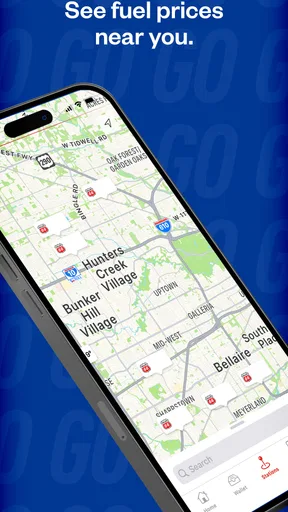
- Quickly locate nearby participating fuel stations.
- View current fuel prices before starting your trip.
- Digital receipts make purchases easier to track.
- Loyalty features can help frequent drivers save money.
- Clean interface makes essential tools easy to find.
Limitations of Fuel Forward
- Station coverage may vary significantly by location.
- Fuel prices can occasionally be delayed or inaccurate.
- Some features require location services to stay enabled.
- Offers and rewards may have regional restrictions.
- The app provides limited value for drivers using other brands.
Similar Picks in This Category
View All
Android Auto
Google LLC4.1

maxim — order a taxi & food
PT. SITO4.7

Штрафы ГИБДД: проверка с фото
Pays LLC – Штрафы ГИБДД4.7

Номерограм – проверка авто
Авто Ассист4.8

Дром Авто
Дром4.9

Frequently Asked Questions
What is Fuel Forward and what can I use it for?
Fuel Forward is a mobile app designed to make fuel purchases and related services more convenient. Depending on the participating station and your location, you may be able to find nearby locations, view fuel prices, plan a stop, access promotions, and pay through the app. Features can vary by country, station, device, and account status, so check the available options in your area after installation.
Does Fuel Forward work at every gas station?
No. Fuel Forward is generally intended for participating fuel stations rather than every station in your region. Before relying on the app during a trip, use its station locator or map to confirm that nearby locations are supported. Availability may also depend on the selected brand, local services, operating hours, fuel types, and whether mobile payment is enabled at that particular station.
Can I pay for fuel directly through Fuel Forward?
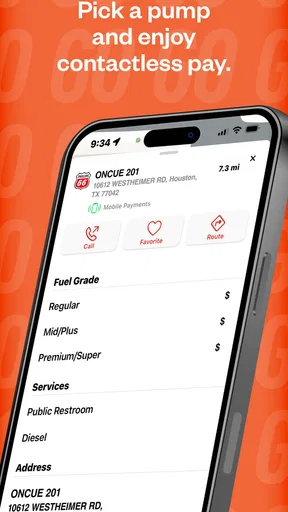
Fuel Forward may support mobile fuel payments at eligible participating locations, allowing you to select a pump or follow the station’s instructions without paying inside. The exact process can differ by station and may require account registration, a compatible payment method, location permissions, or verification. Always confirm the final amount, pump number, and transaction status before leaving.
Is Fuel Forward free to download and use?
The app is typically free to download, although normal mobile data charges may apply when using maps, account services, or payment features. Fuel purchases themselves are charged separately, and participating stations may apply their own prices, temporary authorization holds, or fees. Promotions, rewards, and discounts can have eligibility requirements, expiration dates, and location restrictions.
What permissions and account information does Fuel Forward require?
Fuel Forward may request permissions such as location access, notifications, camera access for scanning, and internet connectivity, depending on the features you use. An account may also require details such as an email address, phone number, or payment information. Review the app’s privacy policy and permission settings, and provide only the access needed for the services you intend to use.
